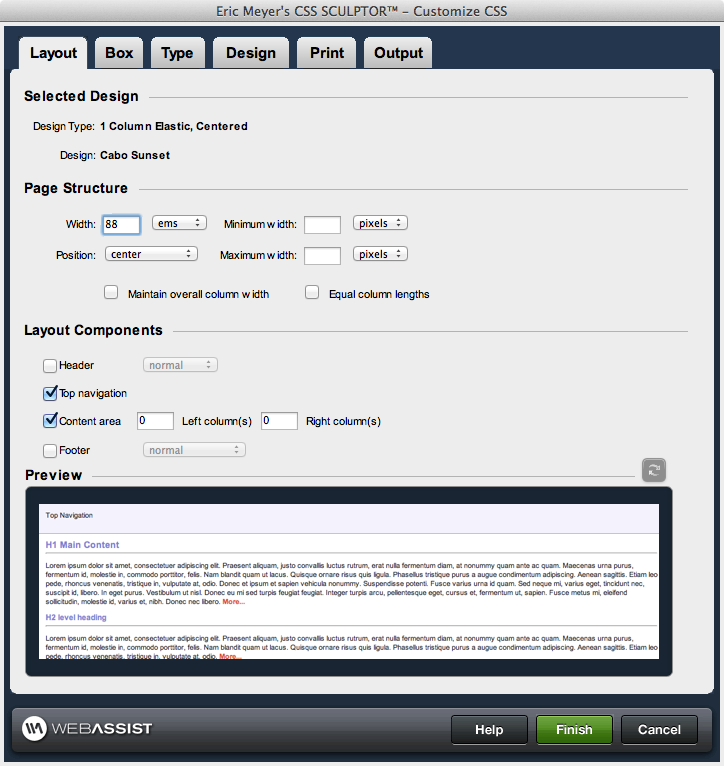
Creating a CSS Sculptor layout
The Customize CSS interface provides you with 6 tabs for
managing the CSS of your layout. Within this interface you can change every aspect of your layout, create new div elements, as well as add Spry accordian, tabbed, and collapsible panels.
The following sections detail each of the tabs options available.
The following sections detail each of the tabs options available.
- Layout: Determines the layout of the page, including width, position, and whether to include header, top navigation and footer div elements.
- Box: Sets the width and height of any layout component, as well as margin or padding values. Allows you to insert new <div> tags and apply float properties to div elements as well as add Spry accordian, tabbed, and collapsible panels.
- Type: Determine a wide range of properties for basic text, h1-h6 tags, and a series of pseudo-classes (link, visited, hover, focus and active). Properties available include font-family, font-size, color, decoration, and weight.
- Design: Allows you to configure all border properties, background color, and background image properties.
- Print: Creates an additiona CSS style sheet to be used for printing. Global settings allow you to quickly set all <div> tags to auto and colors to black and white—or you can change these settings individually for each layout component. You can also optionally hide or zero out margins and padding for any area.
- Output: Define the the destinations for screen and print CSS styles (embedded or in an external style sheet), the degree of placeholder content and comments, and the creation or overwriting of a layout preset to store your layout configuration for future use.