Global File Upload Settings Configuration
The Global File Upload Settings interface allows you to configure the options available within the HTML Editor that are associated with file upload and the File Management feature. Within this interface you can specify the directory that files will be uploaded to, determine the database that will be used for handling file management, and apply SecurityAssist features to restrict file upload for certain Access Rules. The settings defined within this interface will apply to HTML Editor instances throughout your website.
Note: In order to apply security restrictions, SecurityAssist must be installed within Dreamweaver. If it is not installed, the 'Install SecurityAssist' button will display.
The Advanced File Management and SecurityAssist integration both require a connection to a properly configured MySQL database. The HTML Editor will automatically create a number of required database tables with the prefix 'kfm_'. These database tables are created when the HTML Editor instance is first loaded within a web browser.
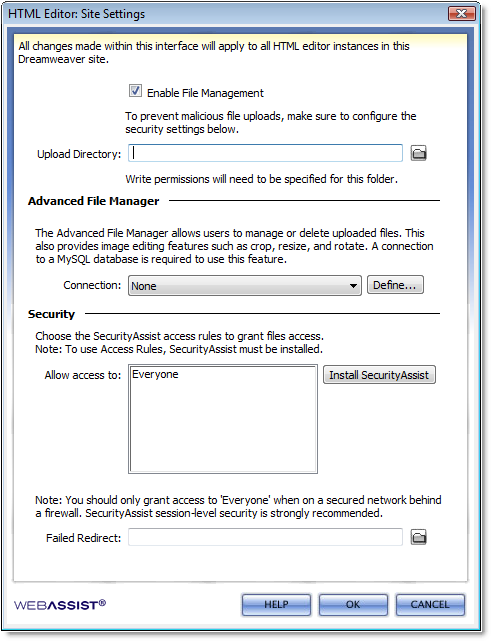 |
Enable File Management: If selected, users of the HTML Editor will be able to manage files that have been uploaded. Upload Directory: Click browse to navigate to the directory that all files will be uploaded to. The HTML Editor creates subfolders to organize uploaded files by type. Note: This directory needs to have Read/Write/Execute permissions set in order for all the File Management features to work. In some cases, you may need to enter your Hosting Provider's Control Panel to modify these permissions. Advanced File ManagerIf a database connection is already defined, choose the desired connection from the menu list. Click Define to specify a new database connection. Note: The HTML Editor assumes that the database you have selected will be used for both SecurityAssist restrictions and File Management. SecurityIf SecurityAssist is installed, choose the appropriate Access Groups to provide file management access to. Failed Redirect: Specify the page users should be redirected to, if they do not have the appropriate file management permissions. |